
Most agencies do not choose agency management software on a quiet afternoon. They choose it when something breaks: a project runs 40% over budget and nobody noticed, a retainer quietly turns into unlimited work, or the month-end invoice run takes three days because hours live in one tool, budgets in a spreadsheet and invoices in another system.
The right agency management system fixes those problems. The wrong one adds another login, another subscription and another place where data goes stale. This guide walks you through how to choose the right agency management software for your agency: what it is, which key features matter, how to compare an all-in-one platform with specialized tools, what it costs, how implementation works, and how to run an evaluation that ends with a confident decision.
This guide is written for creative, marketing, digital, consulting and other professional services agencies. If you are looking for insurance agency management software, the selection principles are similar, but the feature requirements (policies, carriers, commissions) are different.
What is agency management software?
Agency management software is a system that helps agencies manage the full lifecycle of client work in one place: winning the work, planning and delivering it, tracking time and cost, billing the client and getting paid. Some vendors call it an agency management system, an agency management platform or professional services automation (PSA). The labels differ, but the goal is the same: give agency leaders one view of agency operations, from the first lead to the final payment.
These tools help agencies manage growth without adding admin at the same rate. A typical agency management platform combines several functions that agencies otherwise run in separate tools:
- Client relationship management: leads, deals, contacts and client records.
- Proposals and estimates: quotes and scopes that turn into projects once approved.
- Project management: projects, tasks, deadlines and project progress.
- Time management and time tracking: billable and non-billable hours logged against projects.
- Resource management: team capacity, utilization and workload planning.
- Financial management: project budgets, invoicing, expenses, payments and project profitability.
- Client collaboration: a client portal for approvals, documents and payments.
- Reporting: dashboards that show how the entire agency is performing.
Agency management system vs CRM vs project management software
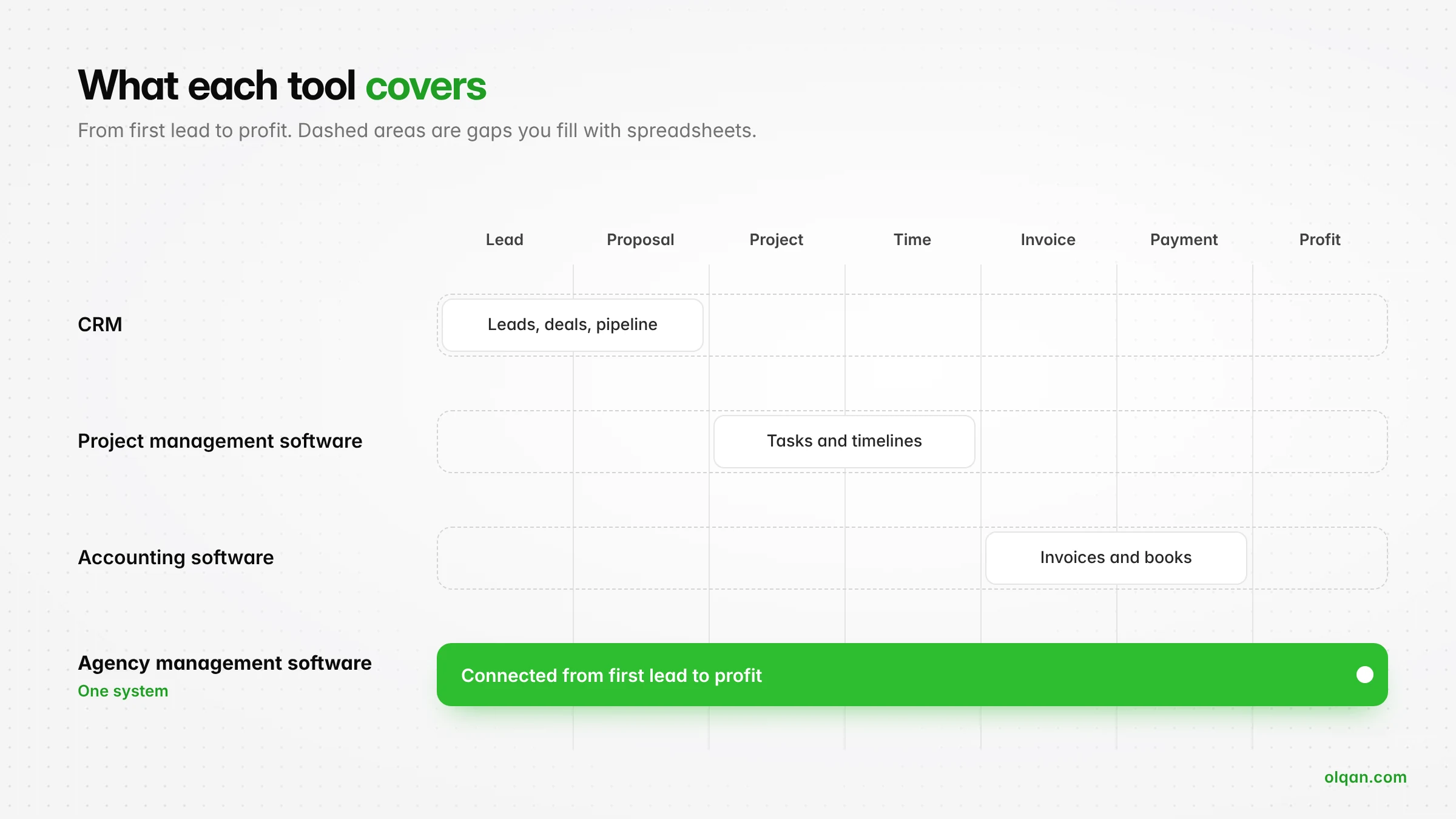
Agencies often ask whether they need an agency management system or whether a CRM or project management software will do. The answer depends on where your problems are.
| Tool type | What it does well | Where it stops |
|---|---|---|
| CRM (customer relationship management) | Tracks leads, deals, pipelines and client communication | Usually ends when the deal is won. No delivery, time tracking or project profitability |
| Project management software | Plans tasks, assigns work and tracks project timelines | Rarely knows what the work costs or what the client is paying. Billing happens elsewhere |
| Accounting software | Handles invoices, expenses and the books | Has no view of hours, scope or project progress |
| Agency management software | Connects sales, delivery, time, budgets, billing and reporting in one system | Can be broader than a very small team needs, and depth varies by vendor |
The core difference: a CRM manages the relationship, project management tools manage the work, and an agency management system connects the relationship, the work and the money. If your biggest pain is losing track of leads, a CRM may be enough. If your biggest pain is not knowing which clients and projects make money, you need agency management software.
That gap is what Olqan was built to close: a won deal becomes a project, logged time becomes an invoice, and every project shows whether it made money. If you are weighing a CRM against a connected system, our Olqan vs HubSpot comparison shows the difference in practice.
Signs your agency has outgrown its current tools
Before you start comparing vendors, confirm you have a problem worth solving. These are the most common signals that an agency needs dedicated agency software:
- You only learn a project went over budget after it closes.
- Team members log time late, in bulk or not at all, so billable hours slip through.
- Invoicing requires exporting timesheets, cleaning them in a spreadsheet and re-entering data.
- Project managers cannot see who has capacity before committing to new work.
- Scope creep is absorbed because nobody can show the client what was agreed.
- Agency leaders wait days for a report on revenue, utilization or project profitability.
- Your team pays for five or more tools that do not share data.
If three or more of these sound familiar, the cost of staying with disconnected tools is already higher than the cost of the right software.
How to choose the right agency management software: 9 steps
The agencies that choose well follow a process. The ones that choose badly watch demos, pick the slickest interface and discover the gaps three months after rollout. Use these steps to choose a system that fits how your agency actually works.
1. Map your agency workflows first
Write down how work moves through your agency today, step by step: lead, proposal, signed scope, project setup, task assignment, time tracking, client approvals, invoicing, payment and reporting. Note who owns each step and which tool they use. Then mark where things break: duplicate data entry, manual handoffs, missed follow-ups, unbilled hours.
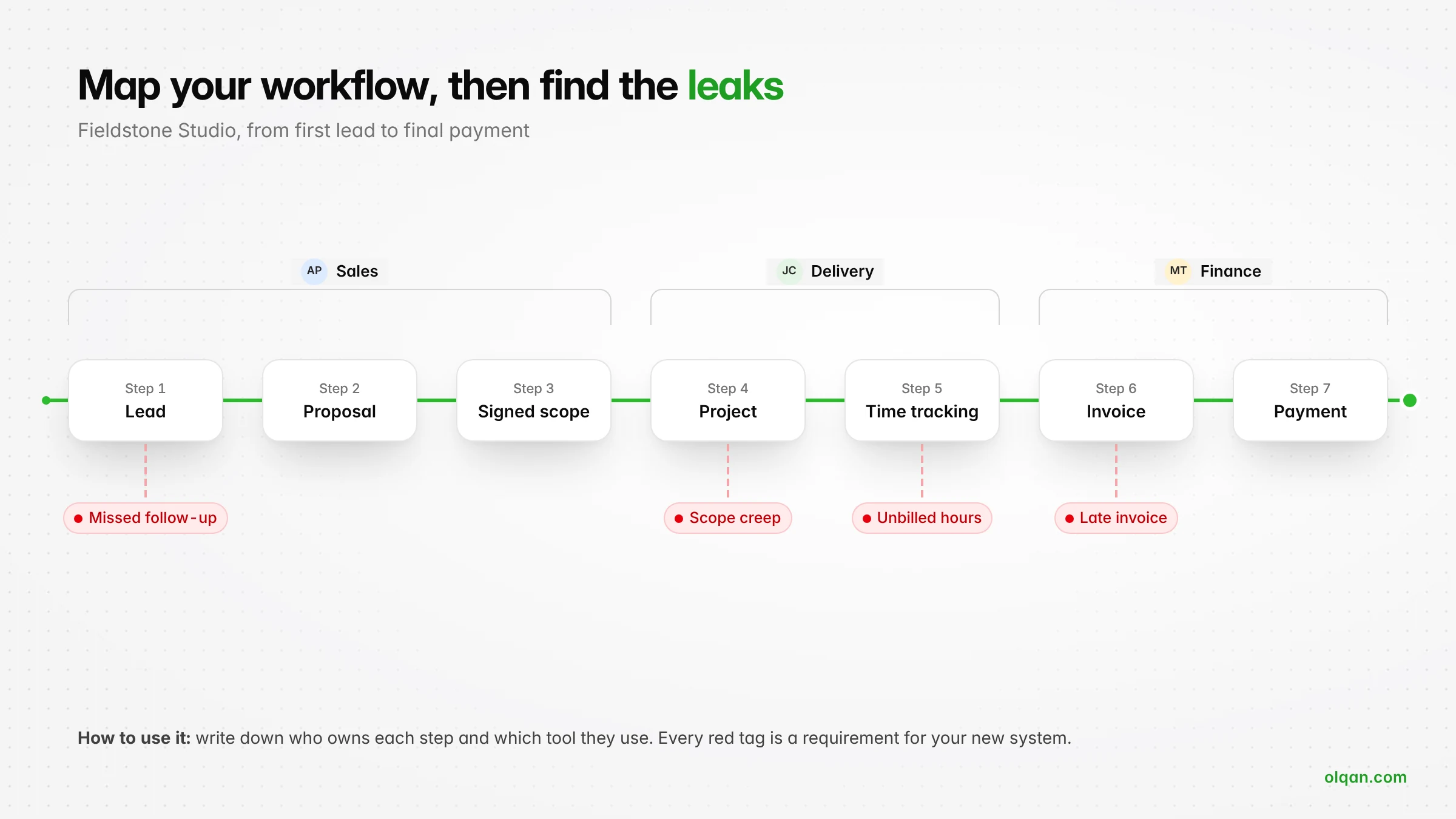
This map becomes your buying brief. Every vendor demo should show how their agency management software handles your agency workflows, not a generic demo account.
2. Separate must-have features from nice-to-have features
List the capabilities you cannot operate without, then the ones that would help but are not essential. A typical must-have list for a service agency includes time tracking, project budgets, invoicing from project time and a clear view of project profitability. Nice-to-haves might include marketing automation, advanced resource scheduling or a knowledge base.
Keep the must-have list short. A long list makes every vendor look equally incomplete and pushes you toward the most expensive option.
3. Decide between an all-in-one platform and specialized tools
This is the biggest strategic choice when choosing agency software.
An all-in-one agency management platform combines project management, time, finance and client management in one system. The advantages: one source of truth, no integrations to maintain, one subscription and data that flows from sale to invoice without re-entry. The trade-off: individual modules may be less deep than the best specialized tool in each category.
A stack of specialized tools (a CRM, a project management tool, a time tracker, an accounting package) gives you the deepest feature set in each area. The trade-off: you pay for several subscriptions, rely on integrations that can break, and still struggle to see project profitability because the data lives in different places.
A simple rule: if your problems are about visibility and handoffs between teams, a connected system usually wins. If one department has highly specialized needs that no platform covers, keep that one specialized tool and connect it to a core system that supports everything else.
4. Match the software to your agency type and size
The best agency management software for a five-person design studio is rarely the best fit for a 60-person digital agency. Consider:
- Team size: small teams need fast setup and simple pricing. Larger agencies need roles and permissions, departments and reporting across teams.
- Business model: retainer-heavy agencies need strong retainer management. Project-based agencies need budgets, milestones and change control. Hourly consultancies need accurate time tracking and billing rates.
- Service mix: creative and marketing agencies care about approvals and revisions. Development agencies care about task management, project planning and the project management methodology they run. Consulting firms care about billable utilization.
- Growth plans: choose a system that supports where the agency grows over the next two to three years, not only where it is today.
5. Check integrations with the tools your team already uses
Even the most complete platform will connect to something: email and calendar, payment gateways, file storage, accounting software or industry-specific marketing tools. List the tools you plan to keep and confirm, for each one, whether the integration is native, available through an API or webhooks, or not available at all.
Ask what data actually syncs and in which direction. “Integrates with” can mean anything from a full two-way sync to a single link in a menu.
6. Evaluate implementation and data migration
Implementation is where many agency software projects fail. Ask each vendor:
- What data can be imported (clients, contacts, projects, open invoices, time history) and in what format?
- Who does the setup: you, the vendor or a partner?
- How long does a typical agency of our size take to go live?
- Can we run the new system alongside the old one for a transition period?
Plan to migrate only what you need. Open projects, active clients and current price lists matter. Five years of closed tasks usually do not.
7. Assess onboarding, customer support and training
The software you choose is only as good as your team’s adoption. Ask what onboarding is included, whether guided setup is available, which support channels exist on your plan, and what self-service documentation looks like. Check whether support is included on every plan or reserved for higher tiers. Strong onboarding shortens the time it takes to see value and reduces the risk that your team quietly returns to spreadsheets.
8. Calculate total cost and return on investment
Compare total cost, not headline price. Total cost includes the subscription for every user who needs access, any setup or onboarding fees, add-ons, integration costs and the internal time spent on implementation. Then compare it against the cost of the tools it replaces and the revenue it recovers. The cost section below shows how to run the numbers.
9. Run a structured trial with real projects
Do not trial software with dummy data. Pick one or two live projects and run them through the system from proposal to invoice. Involve a project manager, a team member who logs time and whoever handles billing. At the end of the trial, ask each of them one question: would this make your week easier or harder? Their answers predict adoption better than any feature list.
Make sure the trial is long enough to complete that loop. Olqan paid plans, for example, include a 14-day trial with no credit card required, which is enough to take one live project from proposal to invoice.
Key features to look for in agency management software
Use this table as a checklist when you compare the best agency management tools. The third column gives you a direct question to ask in every demo.
| Feature | Why it matters | Question to ask the vendor |
|---|---|---|
| Client management and CRM | Keeps leads, deals and client records connected to the work you deliver | Does a won deal turn into a client and project without re-entering data? |
| Proposals and estimates | Standardizes scopes and pricing, and sets the baseline for budgets | Can approved estimates become project budgets and invoices? |
| Project and task management | Organizes delivery, deadlines and project progress | Can we see tasks, owners and status across all projects? |
| Time tracking | The foundation for cost, billing and utilization data | Can team members log billable and non-billable time against tasks in seconds? |
| Resource management | Prevents overbooking and shows who can take new work | Can we see capacity and utilization before we commit to a deadline? |
| Budgets and project profitability | Shows margin while a project is running, not after it closes | Can we see budget versus actual and profitability by project and by client? |
| Invoicing and financial management | Turns delivered work into cash faster | Can we invoice from time logs, milestones and retainers, and track payments? |
| Retainer management | Stops retainers from drifting into unlimited work | Can we track hours used against each retainer every month? |
| Client portal | Reduces email back-and-forth on approvals and payments | Can clients approve, sign and pay in one place? |
| Reporting and dashboards | Gives agency leaders a real-time view of agency performance | Which reports come ready-made for sales, projects and finance? |
| Roles and permissions | Protects client confidentiality and financial data | Can we control who sees rates, salaries and client financials? |
| Automation and AI | Removes repetitive admin work | Which tasks are automated today, and which are on the roadmap? |
Two features deserve special attention because they separate real agency management systems from generic tools: time tracking that flows directly into cost and invoices, and project profitability you can see while the work is in progress. If a platform cannot do both, it will not solve the problem most agencies buy software to fix.
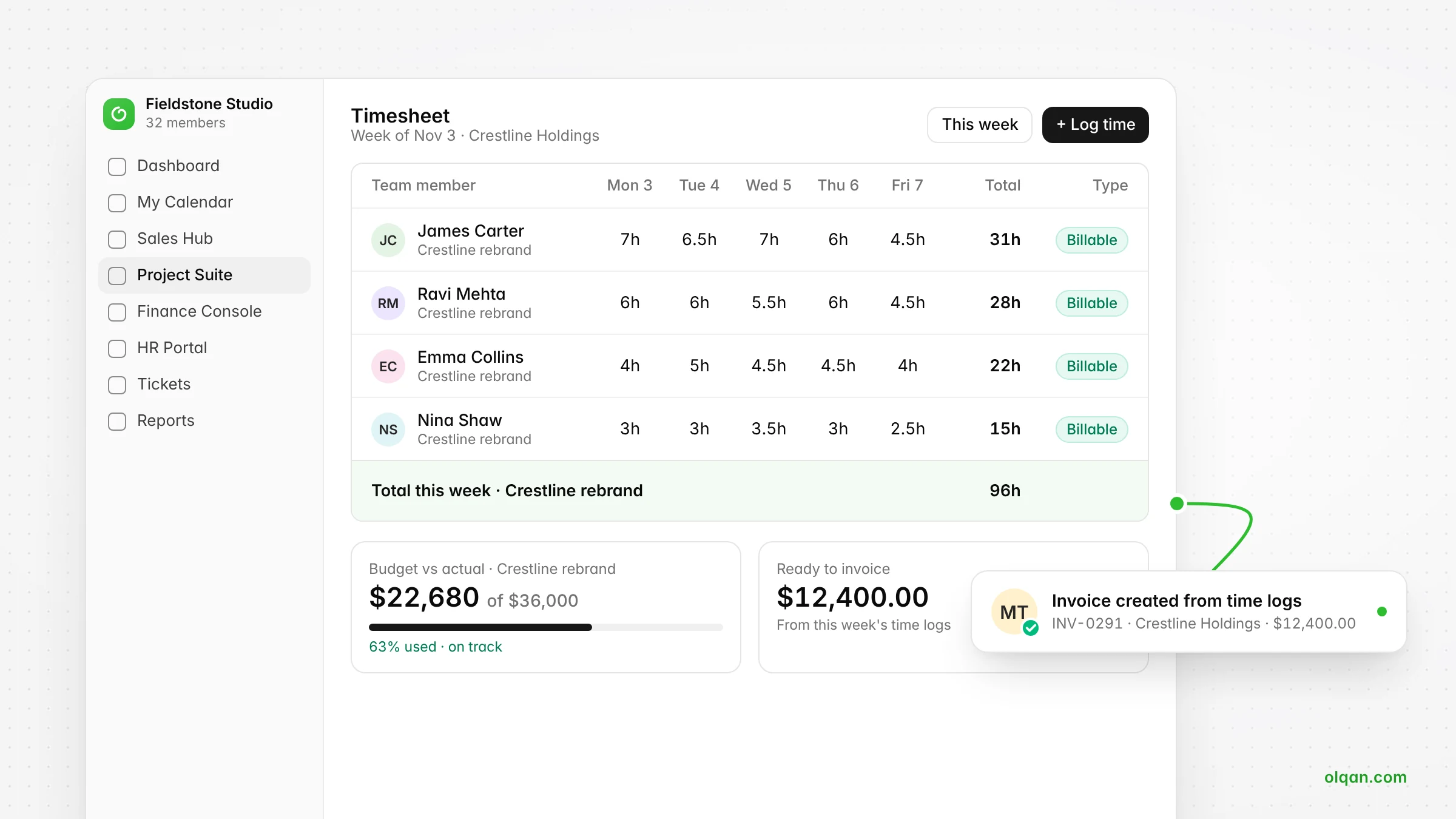
In Olqan, this is how the Project Suite and Finance Console work together: timesheets capture billable and non-billable hours, project budgets show budget versus actual as time is logged, and invoices are created straight from time logs, milestones or retainers.
Want to see these features on a real agency workflow? Book a 30-minute demo. We start with your workflow, then show you Olqan.
Which agency management software is best for your type and size of agency?
There is no single best agency management software for every agency. There is a best fit for your agency. Use these profiles as a starting point.
Freelancers and small studios (1 to 10 people)
Prioritize speed and simplicity: proposals, time tracking, invoicing and basic project management in one place. Look for a free plan or a low per-user price, a short setup and a free trial that does not require a credit card. Avoid platforms that need weeks of configuration.
Growing agencies (10 to 50 people)
This is where disconnected tools start to hurt most. You need resource management, project budgets, budget versus actual, retainer management and reporting across teams. Roles and permissions become important as you add project managers and account leads. A connected agency management platform usually delivers the biggest gain at this stage.
Multi-department agencies (50+ people)
Larger agencies need financial management depth, department-level reporting, HR basics such as attendance and leave, procurement for vendors and freelancers, and strong permissions. Implementation support and a clear data migration plan matter more than any single feature.
By agency type
- Creative and marketing agencies: approvals, revisions, retainers and client collaboration. Marketing agencies with heavy campaign work may keep specialized marketing tools for analytics and connect them to the core system.
- Digital and development agencies: task management, project planning, time tracking by task and fixed-fee budget control.
- Consulting and professional services firms: billable utilization, billing rates, time-based invoicing and profitability by client.
How much does agency management software cost?
Agency software pricing usually follows one of three models:
- Per user, per month: the most common model. Simple to understand, but costs grow with headcount, so check whether every user needs a paid seat.
- Tiered plans: features unlock at higher tiers. Check which tier includes the features on your must-have list, especially time tracking, budgets and invoicing.
- Flat or custom pricing: common for larger agencies, often with an annual contract and implementation fees.
Watch for hidden costs: paid onboarding, premium support, add-on modules, integration fees, extra storage and price increases at renewal. Annual billing is usually cheaper than monthly billing but reduces flexibility. Favor vendors that publish their prices. Olqan, for example, lists every plan on its pricing page.
How to estimate return on investment
ROI comes from three places: tools you cancel, admin time you save and revenue you stop losing. Here is a simple, illustrative example for a 15-person agency (the numbers are hypothetical, so replace them with your own):
- Tools replaced: a CRM, a time tracker and a project management tool at a combined $600 per month.
- Admin time saved: 10 hours per month on invoicing and reporting, valued at $50 per hour, so $500 per month.
- Recovered billable hours: if better time tracking captures just 2 extra billable hours per person per month at $100 per hour, that is $3,000 per month.
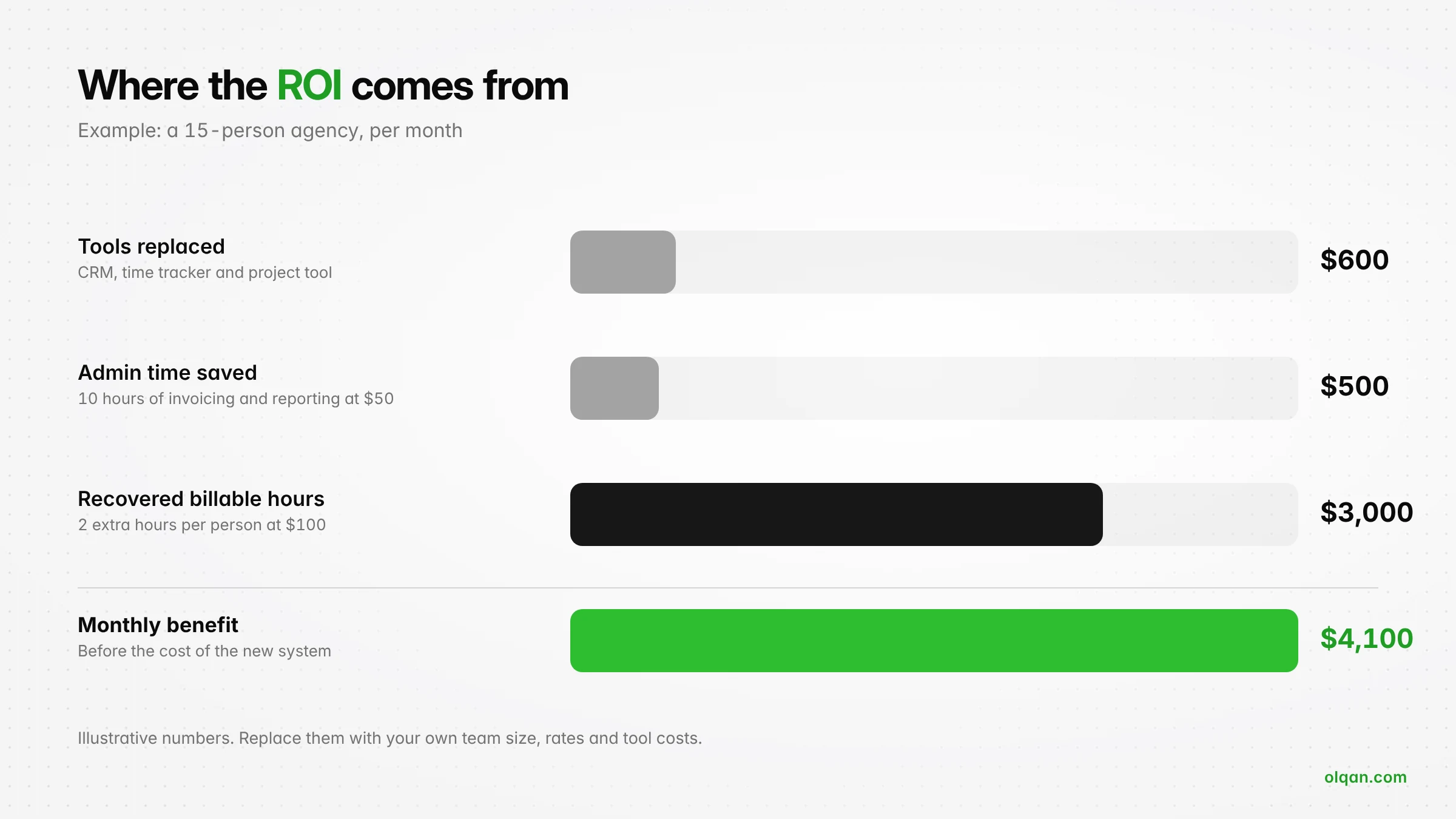
In this example, the monthly benefit is about $4,100. Compare that with the total monthly cost of the new agency management system. Recovered billable hours usually dominate the calculation, which is why accurate time tracking is the feature with the fastest payback.
Implementation and data migration: what to expect
Implementation time depends on agency size, the number of modules you roll out and how clean your data is. Small teams can often be working in a new system within days. Larger agencies should plan for a phased rollout over several weeks. A practical sequence:
- Prepare: clean your client list, price lists and active projects. Decide who owns the rollout.
- Configure: set up users, roles, billing rates, project templates and invoice settings.
- Import: bring in clients, contacts and open projects. Leave historical data in your old tools if you can access it there.
- Pilot: run one team or a few projects in the new system for two to four weeks.
- Roll out: move the rest of the agency, then switch off the old tools so nobody falls back to them.
- Review: after 60 days, check adoption: are timesheets complete, are budgets set, are invoices going out from the system?
The most common failure is a soft launch with no deadline for switching off old tools. Set the date and keep it.
How agency management software improves delivery, resource planning and profitability
The real value of agency management software is not the features themselves. It is what happens when sales, delivery and finance share the same data.
- Project delivery: project managers see tasks, deadlines and hours used against budget in one place, so they catch overruns early instead of explaining them at the end.
- Resource planning: leaders can see capacity before they say yes to a new client, which reduces burnout and missed deadlines.
- Scope control: when the approved estimate and the hours logged sit side by side, it is easier to show a client when a request is out of scope and raise a change order.
- Faster billing: invoices come from logged time, milestones or retainers, not from a spreadsheet rebuilt every month.
- Project profitability: margin is visible by project and by client, so you can reprice, rescope or grow the work that actually makes money.
An agency software evaluation scorecard
Score each shortlisted vendor from 1 to 5 on each criterion, multiply by the weight, and add up the total. Adjust the weights to match your agency needs.
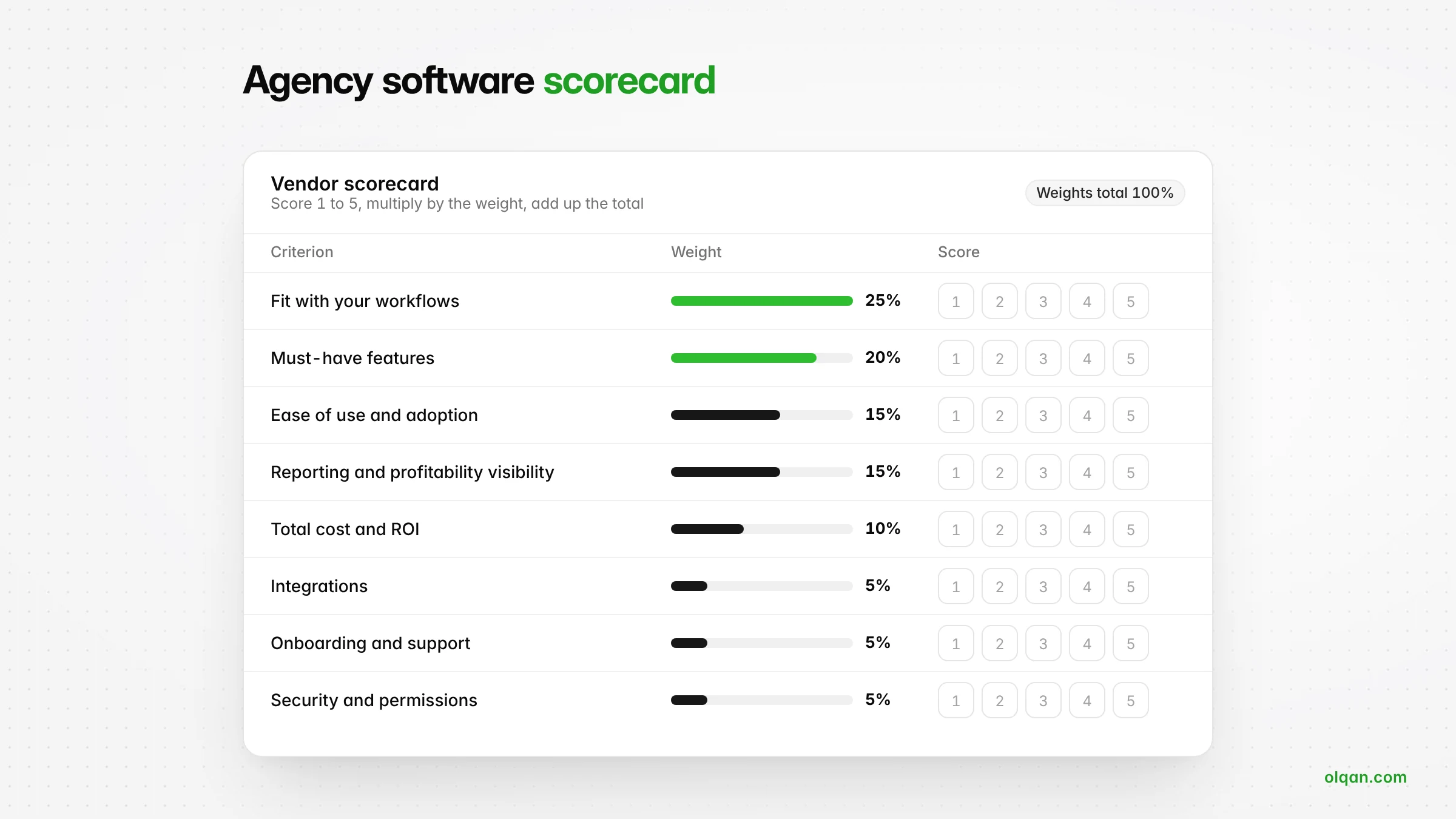
| Criterion | Weight | What a 5 looks like |
|---|---|---|
| Fit with your workflows | 25% | Handles your process from lead to payment without workarounds |
| Must-have features | 20% | Every must-have works in the trial, not only in the demo |
| Ease of use and adoption | 15% | Your team logs time and updates tasks without reminders |
| Reporting and profitability visibility | 15% | Budget versus actual and profitability by project and client, in real time |
| Total cost and ROI | 10% | Clear pricing, no surprise add-ons, payback within months |
| Integrations | 5% | Connects to the tools you are keeping |
| Onboarding and support | 5% | Clear onboarding path and responsive support on your plan |
| Security and permissions | 5% | Role-based access to rates, financials and client data |
Common mistakes agencies make when choosing software
- Choosing on demos alone: demos show the best path. Trials with real projects show the real one.
- Buying for features you will never use: pay for what solves today’s problems and supports the next stage of growth.
- Ignoring the people who use it daily: if team members find time tracking slow, your profitability data will be wrong.
- Underestimating implementation: without an owner and a switch-off date, old habits win.
- Treating a CRM or project management tool as an agency management system: neither will tell you which clients make money.
- Skipping the cost of disconnected tools: the subscriptions are visible. The unbilled hours and manual admin are not.
Where Olqan fits as your agency management system
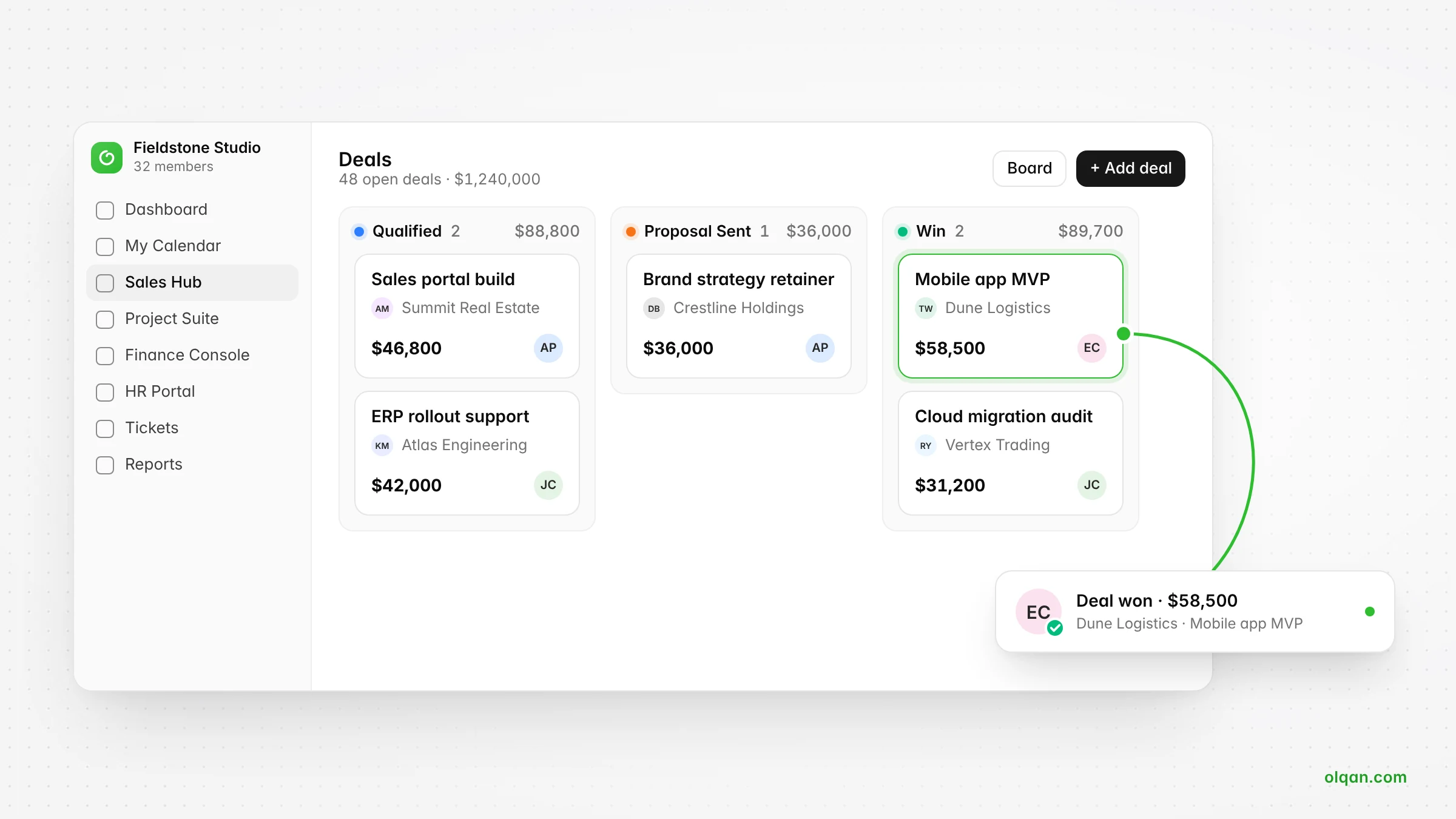
Olqan is a business operating system that helps growing companies grow profitably. Olqan for agencies and Olqan for consulting firms connect the work from first lead to final payment in one system:
- Win more: manage leads and deals on a pipeline board, create proposals and estimates from templates, and track contracts.
- Deliver profitably: run projects, tasks and timesheets, track billable and non-billable time, set project budgets and see budget versus actual, project profitability, utilization and capacity.
- Get paid faster: invoice from project time, milestones and retainers, set up recurring invoices, track expenses and payments, send reminders and reconcile. Clients can approve, sign and pay through the Client Portal, and online payments run through payment gateways such as Stripe that you connect from the Olqan marketplace.
- Scale with less overhead: manage support tickets, a knowledge base, employee records, attendance and leave, and procurement, with ready-made reports across sales, projects and finance.
Pricing is simple: a free Solo plan, then Team at $12 and Business at $19 per user per month, billed yearly (see all plans). Paid plans include a 14-day trial with no credit card required. Support on every plan includes email, in-app tickets, an AI agent and documentation, and guided onboarding is available as a separate service. Start free, or book a demo to see how Olqan would handle your workflow.
Frequently asked questions
What is the difference between an agency management system and a CRM?
A CRM manages leads, deals and client relationships. An agency management system includes client management but also covers project delivery, time tracking, budgets, invoicing and project profitability, so it connects the relationship, the work and the money.
How long does it take to implement an agency management system?
Small agencies can often start within days. Larger agencies with several teams and more data to migrate should plan for a phased rollout over several weeks, including a pilot.
Is there good free software for agencies?
Some platforms offer free plans for individuals or very small teams. They are useful for freelancers and early-stage studios, but growing agencies usually need paid features such as multiple users, budgets, resource management and reporting.
What features matter most for scaling agencies?
Time tracking connected to cost, project budgets with budget versus actual, resource management, invoicing from project data, retainer management and reporting on profitability by project and client.
Can agency management software integrate with the tools my team already uses?
Most platforms offer native integrations, an API or webhooks. Before you choose, list the tools you plan to keep and confirm what data syncs, in which direction and on which plan.
Conclusion
Choosing agency management software is less about finding the platform with the most features and more about finding the system that fits how your agency wins, delivers and bills work. Map your workflows, keep your must-have list short, decide between an all-in-one platform and specialized tools, test with real projects and calculate the full cost against the hours and revenue you recover. Do that, and the right agency management system will not just organize your agency. It will show you where the profit is.