
Most agencies do not have a delivery problem. They have a billing gap. The project is signed, the team does the work, and then someone has to rebuild the numbers in a separate invoicing tool: which milestone is due, how many hours were logged, what was agreed for extra requests. Every handoff between tools is a place where billable hours go missing and invoices go out late.
Project management software with invoicing closes that gap. This guide explains what it is, walks through the full workflow from client agreement to payment, and gives you a checklist of features and vendor questions so you can choose the right tool for your agency.
What is project management software with invoicing?
Project management software with invoicing is a tool that lets you plan and deliver client work and bill for it in the same system. Instead of exporting timesheets or copying milestone amounts into a separate billing tool, you create invoices directly from the project: from tracked time, completed milestones, retainers, expenses or the fixed fee agreed with the client.
The core idea is simple: the project data that proves the work was done is the same data that drives the invoice. For agencies, consultancies and other service businesses that sell time, deliverables or both, that connection is what protects revenue.
Why agencies need project management and invoicing in one place
Separate tools look cheaper on paper. In practice, the cost shows up in three places:
- Unbilled work: hours logged in the project management tool never reach the invoice because nobody reconciled them before billing day.
- Late invoices and slower cash flow: the project manager knows a milestone is done, but finance only finds out at month end. Every day of delay pushes payment later.
- Manual data entry and errors: rates, client details, purchase order numbers and tax settings get retyped, and small mistakes lead to disputes and delayed payment.
An integrated project management and invoicing tool fixes these by keeping the agreement, the work and the billing data connected. Project managers can see what is ready to bill, finance can invoice without chasing information, and leadership can see project profitability without building a spreadsheet. If you want the full picture of what a connected system covers, our guide on how to choose agency management software goes further.
The workflow from client agreement to payment
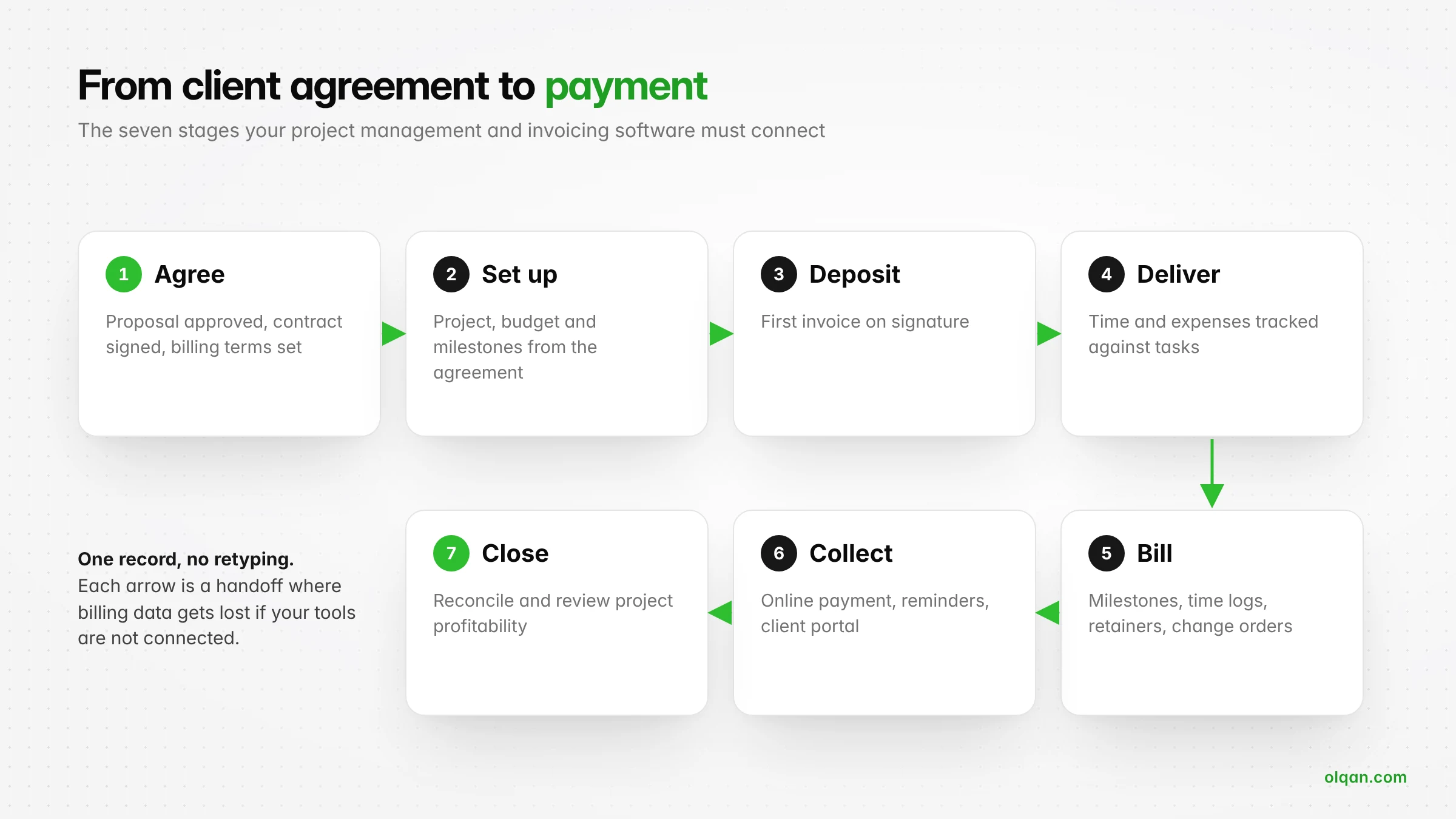
Before you compare tools, map the workflow they need to support. For most agencies it has seven stages. Use them as a test: a good tool carries data from one stage to the next without retyping.
1. Agree scope, price and billing terms
The billing process starts before the project does. Your proposal or estimate defines the scope, the price and how you will bill: a fixed fee split into milestones, time and materials at agreed billing rates, a monthly retainer, or a mix. Once the client approves and signs, those terms should become the rules the project and invoices follow. Look for software where an approved proposal or estimate does not have to be rebuilt by hand.
2. Set up the project with its budget and milestones
Create the project from the agreement with its client, budget, milestones and billing method. This is where project budgeting starts: the hours and fee you sold become the baseline you will track against. If milestones and amounts are set up now, invoicing later is a click, not a calculation.
3. Invoice the deposit
Many agencies bill a deposit on signature, often 30% to 50% of a fixed fee. Sending it immediately sets the payment rhythm for the whole engagement and protects cash flow while the team ramps up.
4. Track time and expenses during delivery
Time tracking is the foundation of accurate billing. Team members log time against tasks, the software records whether each entry is billable, and project expenses such as freelancers, stock assets or travel are captured against the project. For time and materials work this data becomes the invoice. For fixed-fee work it tells you whether the project is still profitable.
5. Bill milestones, time or retainers as work is completed
When a milestone is approved, the invoice should be ready to go. For time-based work, you should be able to pull approved, unbilled time logs for a date range into an invoice in one step. Retainer clients need recurring billing on a fixed schedule. Out-of-scope requests should be priced as a change order and billed separately rather than absorbed.
6. Send, remind and collect payment
Use invoice templates with your branding, clear due dates and payment details. Online payment by card or bank transfer through a connected payment gateway shortens the time to payment, and automatic payment reminders remove the awkward follow-up emails. A client portal where clients can view invoices, approve work and pay in one place reduces the back-and-forth further.
7. Reconcile, close and review profitability
Record payments against invoices, reconcile them with your bank or accounting software, and close the project. Then compare what you sold with what it cost to deliver. Our guide on how to calculate agency project profitability shows the formulas.
Worked example: a $40,000 fixed-fee website project
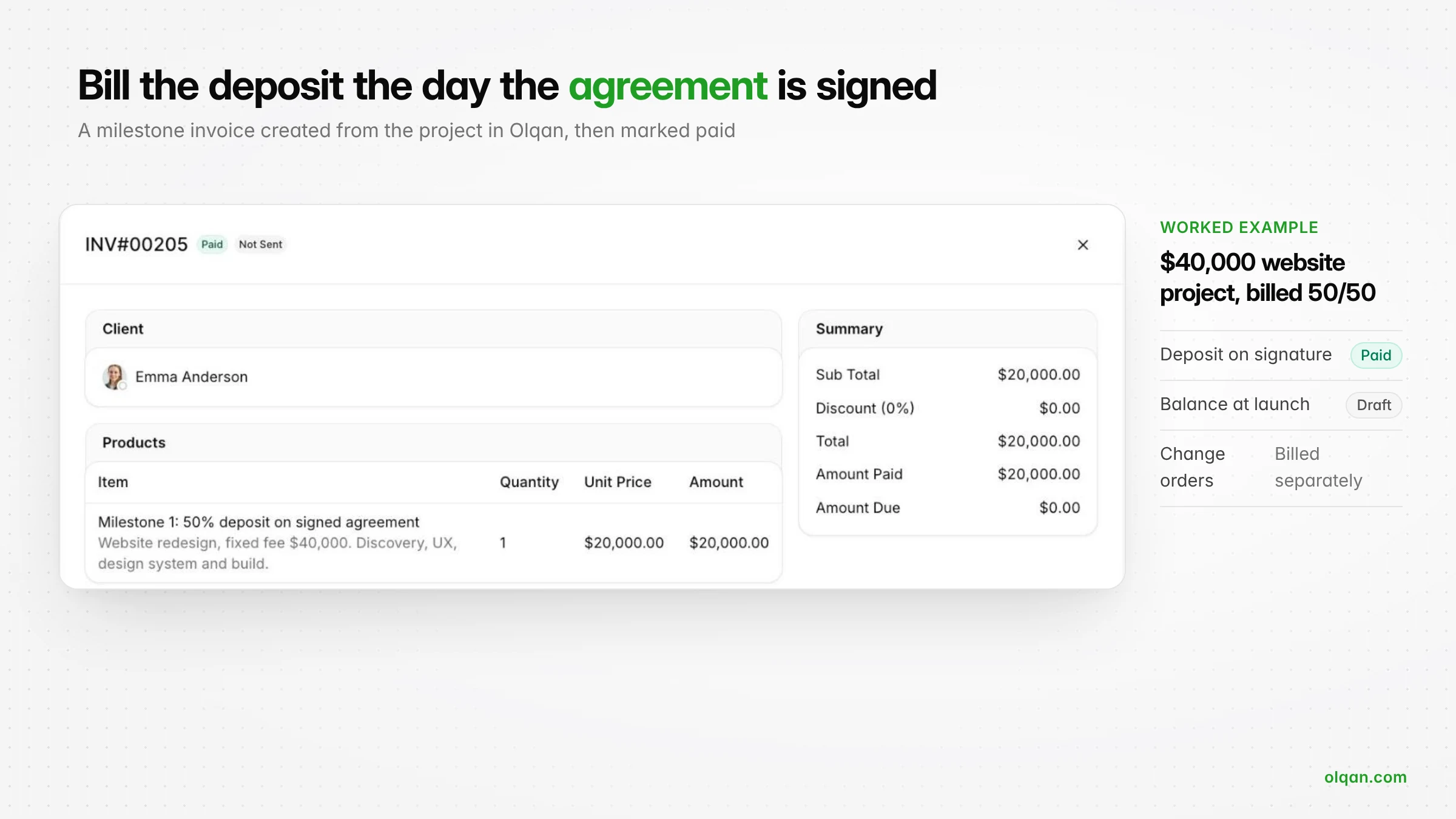
Here is how that workflow looks on a real project (illustrative figures). An agency signs a website redesign for a fixed fee of $40,000, billed in two milestones:
- Milestone 1: 50% deposit on the signed agreement, $20,000. Invoiced on day one and paid by bank transfer within the week.
- Milestone 2: the remaining 50% at launch, $20,000. Prepared as a draft from the start, so it is ready to send the day the site goes live.
- During delivery: the team logs time against discovery, design and build tasks. After week one, 71 of 300 planned hours are used, so the project is on track.
- If the client asks for extra pages: the project manager raises a change order and bills it separately instead of adding hours to a fixed fee.
Billing methods your software must support
Agencies rarely use one billing method. Check that your shortlist handles every model you sell today and the ones you plan to sell next.
| Billing method | How it works | What the software must do |
|---|---|---|
| Fixed fee and milestone billing | An agreed price billed in stages, such as deposit, design sign-off and launch | Store milestones with amounts and invoice each one when it is reached |
| Time and materials | Hours billed at agreed billing rates, plus expenses | Turn approved, unbilled time logs and expenses into an invoice without exports |
| Retainers | A fixed monthly fee for an agreed scope or number of hours | Recurring billing on a schedule, plus tracking hours used against the retainer |
| Change orders | Extra scope priced and approved separately | Add billable items to a project without editing the original agreement |
| Pass-through expenses | Third-party costs re-billed to the client, with or without markup | Capture expenses against the project and add them to the next invoice |
Key features to look for
Use this table as a checklist in every demo. The third column is the question that separates real invoicing capabilities from a basic invoicing feature.
| Feature | Why it matters | Question to ask the vendor |
|---|---|---|
| Time tracking and billable hours | Every hour you cannot see is an hour you cannot bill | Can team members mark time as billable or non-billable against a task in seconds? |
| Invoices from project data | Removes retyping and missed hours | Can we create an invoice from time logs, milestones or a retainer in one step? |
| Invoice templates | Professional, consistent invoices that clients pay faster | Can we add our logo, payment terms, tax settings and notes to a template? |
| Recurring billing | Retainers bill on time without anyone remembering to do it | Can we automate invoicing for clients we bill every month? |
| Online payments | Shortens the time from invoice to cash | Which payment gateways can clients use, and what do they cost? |
| Payment reminders | Late payment is a cash flow problem, not a client problem | Can reminders go out automatically before and after the due date? |
| Client portal | Approvals and payments happen in one place | Can clients approve proposals, sign and pay without email back-and-forth? |
| Invoice status tracking | Shows what is drafted, sent, unpaid, partly paid and paid | Can we see every invoice by status for one project and across all clients? |
| Tax and e-invoicing | Required by law in a growing number of countries | Does it support the tax rates and e-invoicing rules in our markets? |
| Accounting software integration | Keeps financial records consistent and reduces month-end work | How do invoices and payments sync with our accounting software? |
| Project budgeting and profitability | Billing is only half the story; cost is the other half | Can we see budget versus actual and project profitability while work is in progress? |
| Reporting | Gives leadership one view of billing, cash and delivery | Which reports show unbilled work, overdue invoices and revenue by client? |
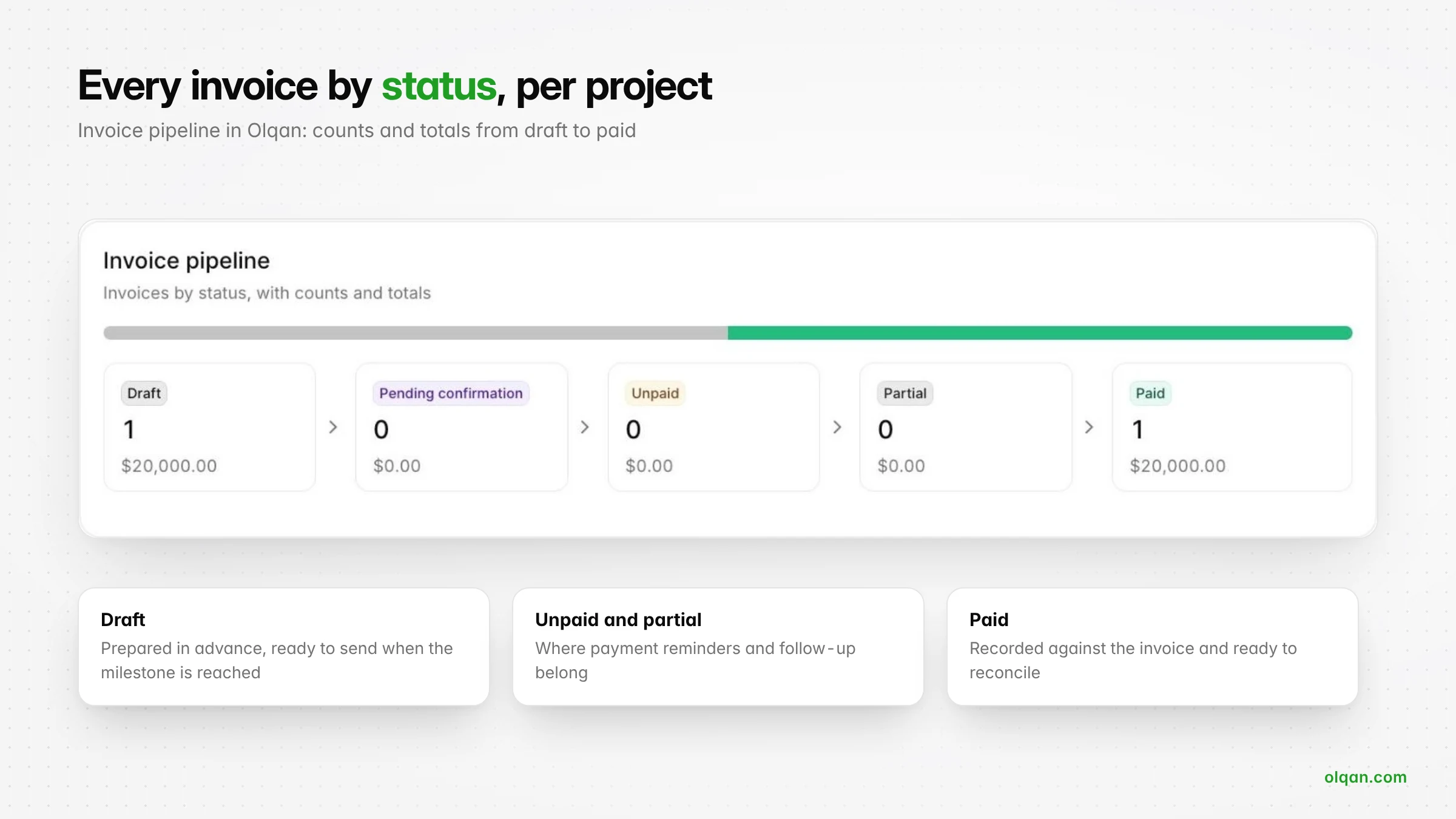
Integrated platform vs separate billing tools
There are three common setups. None is wrong, but each has a cost.
| Setup | Strengths | Watch out for |
|---|---|---|
| Project management tool plus a separate invoicing or accounting tool | Strong task management; familiar accounting software | Manual exports or fragile integrations; unbilled time; nobody owns the handoff |
| Accounting or billing software with basic project tracking | Strong invoicing and financial management | Weak task management, so the team keeps a second tool for delivery and time is logged twice |
| Integrated project management and billing platform | One record from agreement to payment; project profitability in real time | Migration effort; check that both the project management capabilities and the billing features are strong enough |
For small businesses with a handful of projects, separate tools can work if someone reconciles them every week. Once you run several projects with different billing methods, the time spent reconciling tools and chasing unbilled hours usually becomes the bigger cost.
How to evaluate your shortlist
- Pick one real project. Ideally a fixed-fee project with a deposit, milestones and at least one change request.
- Run the full workflow in a trial. Agreement, project setup, deposit invoice, time tracking, milestone invoice, payment and reconciliation.
- Involve the people who will use it. A project manager, a team member who logs time and whoever sends invoices today.
- Measure the handoffs. Count how many times you retyped data. The best tool is the one where that number is close to zero.
- Check the total cost. Include per-user pricing, payment processing fees, integrations and the time you will spend on setup.
Common mistakes when choosing invoicing and billing tools
- Choosing on invoice design alone. A beautiful invoice template does not fix missing hours.
- Ignoring how time is captured. If logging time is slow, people log it late or not at all, and billing accuracy falls.
- Forgetting change orders. If extra scope has nowhere to go, it gets absorbed into the fixed fee.
- Skipping tax and e-invoicing requirements. Check your markets before you commit, not after your first audit.
- Not testing the client side. Send yourself an invoice and pay it. If it is confusing for you, it is confusing for your clients.

How Olqan connects projects and invoicing
Olqan is a business operating system that helps growing service businesses, including agencies and consulting firms, grow profitably. Sales, projects and finance live in one system, so the agreement, the work and the invoice stay connected:
- Agree: create proposals and estimates from templates, track contracts, and let clients approve and sign through the Client Portal.
- Deliver: run projects, tasks and timesheets in the Project Suite, track billable and non-billable time, and see budget versus actual and project profitability.
- Bill: invoice from project time logs, milestones and retainers, set up recurring invoices, and track every invoice by status in the Finance Console.
- Get paid: collect online payments through gateways such as Stripe, send payment reminders, record payments and reconcile.
Olqan offers a free Solo plan, and paid plans include a 14-day trial with no credit card required, which is enough to run one project from agreement to payment. If you prefer a walkthrough, book a demo and we will start with your billing workflow.
Frequently asked questions
Can I create invoices from projects and timesheets?
Yes, if the tool supports project invoicing. Look for the ability to select approved, unbilled time logs for a project and date range and turn them into invoice lines, so hours do not need to be exported or retyped.
Can I automate invoices for clients I bill regularly?
Most invoicing software supports recurring billing. Set the amount, frequency and start date once, and the invoice is created on schedule. For retainers, also track hours used against the retainer so the scope does not drift.
How does billing software help improve cash flow?
It shortens every step between finishing work and receiving money: invoices go out as soon as milestones are reached, clients can pay online, and payment reminders follow up automatically. Status tracking shows what is overdue before it becomes a problem.
How difficult is it to switch from separate tools to integrated project management and billing software?
Start with new projects rather than migrating everything. Import clients, set up invoice templates, tax rates and payment gateways, then run new work in the new system while old projects finish in the old one. This keeps the switch manageable and lets you compare both setups on real work.
How should we handle changes to project scope in billing?
Treat every out-of-scope request as a change order: describe it, price it, get approval and bill it as a separate line or invoice. Your software should let you add these to the project without editing the original agreement.
Conclusion
The best project management software with invoicing is the one that carries data from the signed agreement to the paid invoice without anyone retyping it. Map your workflow, list the billing methods you use, test the full loop on one real project, and judge every tool by how many handoffs it removes. Do that, and invoicing stops being a month-end chore and becomes a steady flow of cash from the work you already did.