Olqan

Give every client one place to keep up.

Clients follow their projects, share files, message your team, sign proposals and contracts, pay invoices and raise tickets in one portal with your logo and brand.

Contracts
Projects
Brand
Invoices
Tickets
Proposals
Files
Pay
Messages
Approve
Guides
Sign
Estimates
Status
Replies
Everything your clients need, in one place.

Fewer emails. Faster answers.
Give clients the status, the documents and the invoices they ask about, before they ask.

Follow
Clients see their projects and where each one stands.
Creating and sending an invoice in Olqan
Sign
Clients review and sign proposals, estimates and contracts.
Client paying an Olqan invoice online
Pay
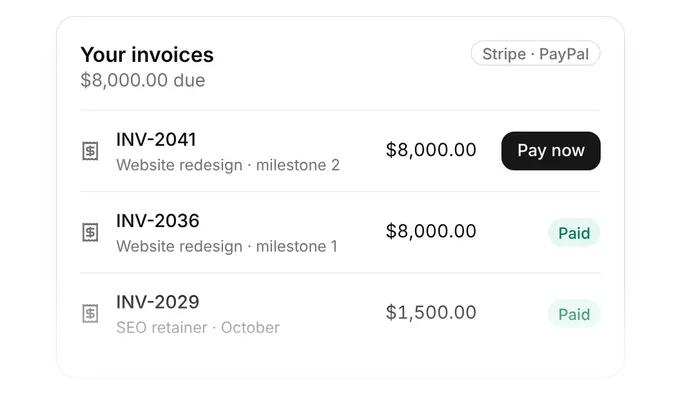
Clients see every invoice and pay online.
Olqan finance reports including profit and loss

Built around what clients ask for.
Pick a part of the portal and see it in Olqan.

Your branded portal

Invite a client and they sign in to a portal with your logo and brand, using their own account.

Your logo and brand
Own login for each client
Invite clients from Olqan
Olqan invoices list with amounts owed and payment status

Projects

Clients see their projects and the status of each one, without asking your team for an update.

Every project in one list
Status on each project
Fewer update emails
Olqan payments matched to invoices

Files and messages

Share files with clients and keep the conversation next to the work instead of in email.

Share files with clients
Message your team
Everything next to the project
Olqan expenses with receipts and approval status

Proposals and contracts

Clients review proposals, estimates and contracts and sign them in the portal on any device.

Review before signing
Sign on any device
Signed copy for both sides
Olqan credit and debit notes linked to invoices

Invoices and payments

Clients see every invoice and pay online with Stripe or PayPal.

All invoices in one place
Pay online
Paid invoices close on their own
Olqan tax rates applied to invoices

Tickets and help articles

Clients find answers in your knowledge base or raise a ticket and follow every reply.

Knowledge base articles
Raise a ticket from the portal
Follow every reply
Olqan ready-made finance reports

Your team stays in sync

When a client signs, pays or raises a ticket, your team sees it in Olqan right away.

Signed documents show up in Olqan
Payments recorded on the invoice
New tickets go to your support team
Olqan ready-made finance reports

Teams that run on Olqan.
What our customers say.

“It's really convenient for my team to do cross-functional tasks from sales to managing their times and keeping track of everything.”

Ibrahim Barhumi
Ibrahim Barhumi

Founder & CEO

“I use Olqan for my entire company and it really solves various operational areas like Operation, Sales, and HR.”

Sochenda Hassig
Sochenda Hassig

Chief Financial Officer

“We tried other platforms over the last year or two, but none of them have come close to Olqan.”

Kaelan Boyd
Kaelan Boyd

Nonprofit Founder

From invite to paid.
The Client Portal is part of Olqan. What clients do in the portal lands in the same system as your projects and finance.

1
Client invited
You invite the client and they get their own login.
2
Proposal signed
The client signs the proposal in the portal.
3
Work followed
The client follows the project status.
4
Invoice paid
The client pays the invoice online.

Questions about the Client Portal.

A branded portal where your clients follow their projects, share files, message your team, sign proposals and contracts, pay invoices and raise tickets. It is connected to the rest of Olqan.

Yes. The portal shows your logo and brand, and each client you invite signs in with their own account.

Their projects, files, messages, proposals, estimates, contracts, invoices, tickets and your knowledge base articles.

Yes. Clients pay online with Stripe or PayPal once you connect them in Olqan.

Yes. Clients review and sign proposals, estimates and contracts on their phone or computer.

Yes. Clients can read your knowledge base articles in the portal, and raise a ticket when they still need help.

No. The Client Portal is part of Olqan, so what clients do there shows up in your projects, finance and tickets.

Give your clients one place with Olqan.

Start free and invite your first client.